Information
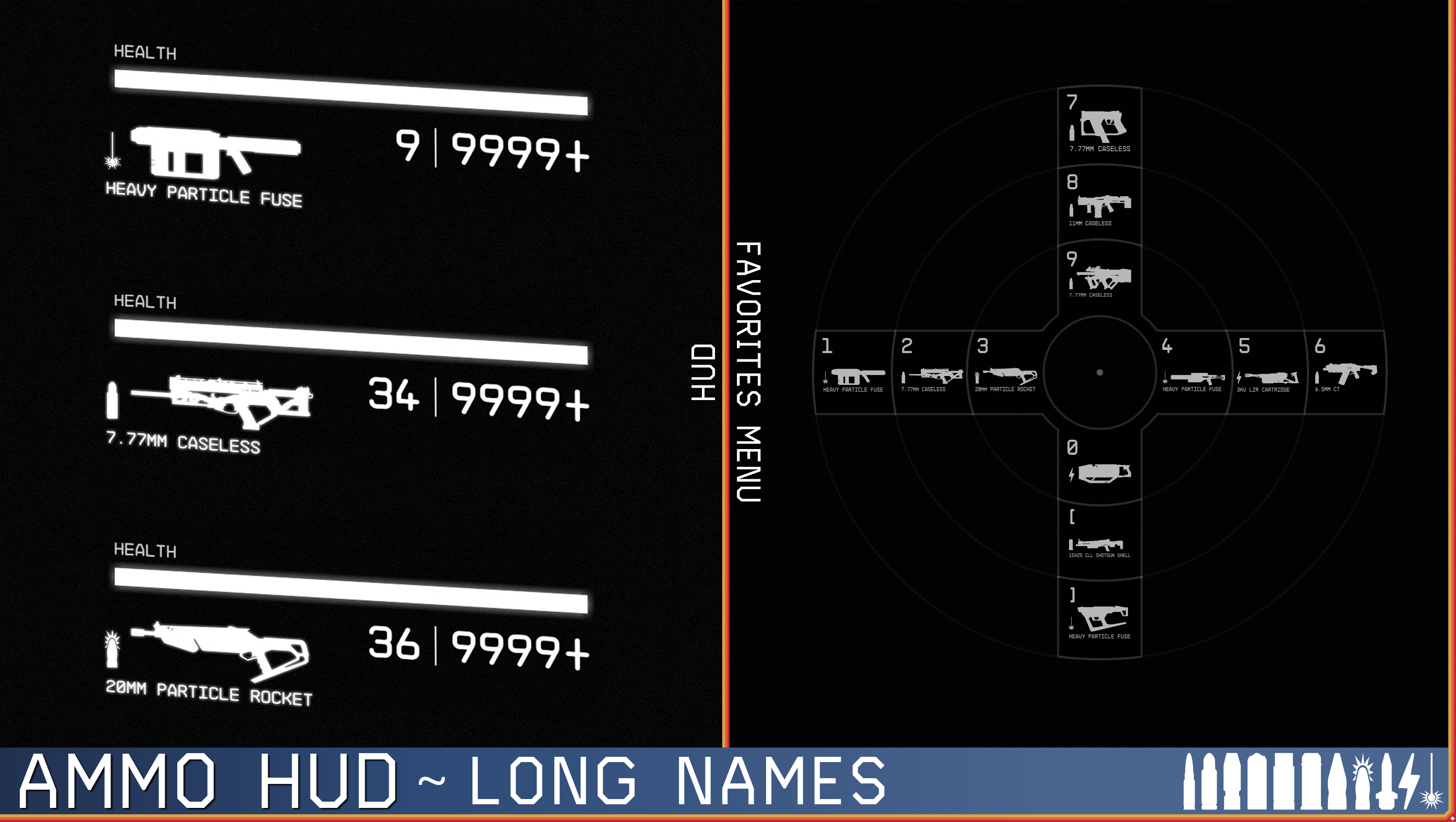
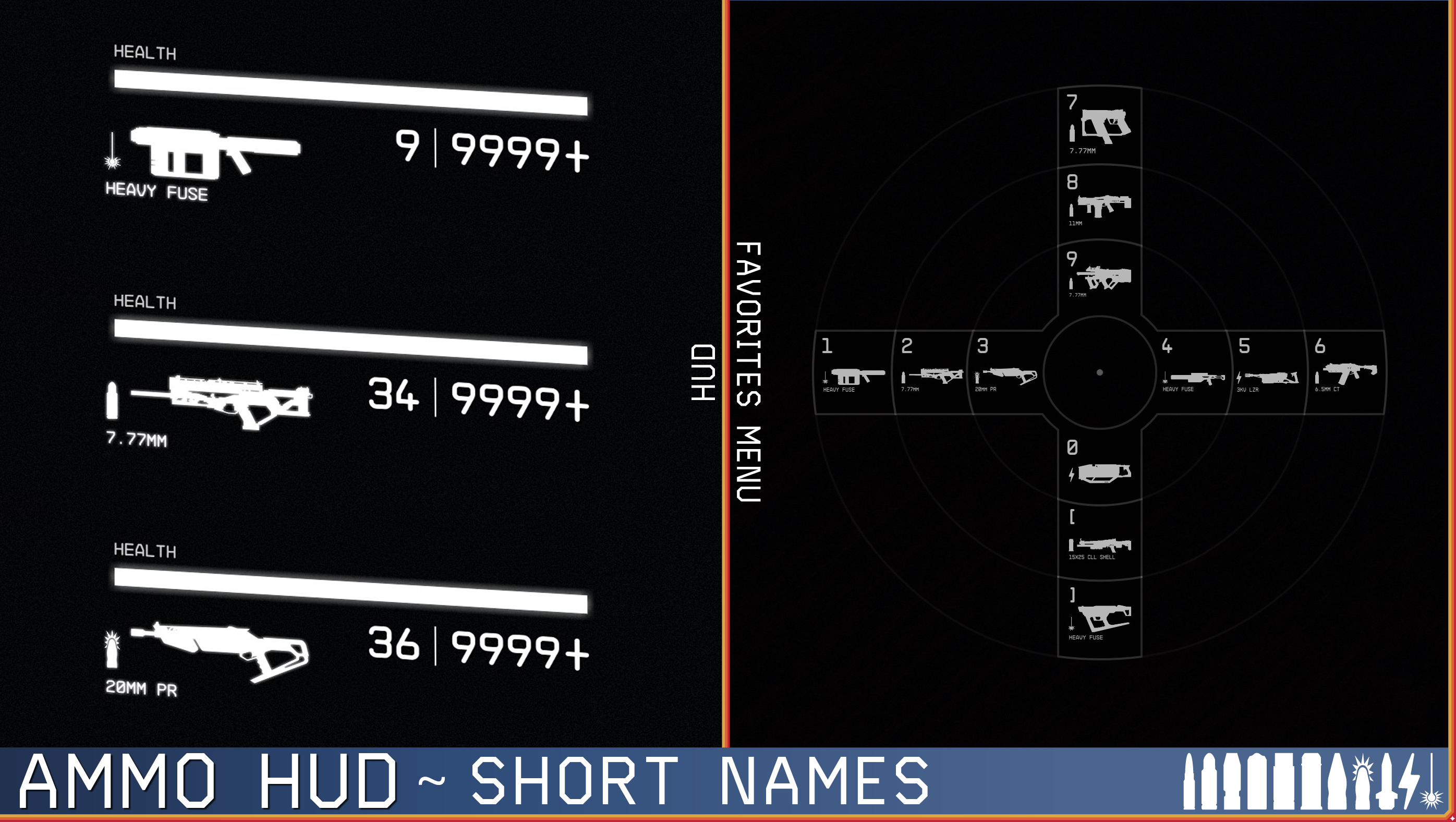
Adds custom weapon icons with ammunition icons and labels to the HUD and Favorites menu.
Ammo HUD currently has support for over 124 mods with custom weapons either natively or via an optional patch.
All optional patches are included in the FOMOD installer (and my Creations profile) as well as extra patches which support Magnetic Weapon Holsters when there is a pistol or melee weapon (all Ammo HUD X Magnetic Weapon Holsters patches do not require any other Magnetic Weapon Holsters patches to function).
All UI files are set to 60 fps but that doesn't mean a lot as these files don't contain any animations and are just static image references.
This is built on the v1.14.70 (Shattered Space) UI files, but it is backwards compatible to previous versions as well.
Ammo Label Options

There are three ammo label options:
- Long Labels: This shows the full name for each ammo (e.g. Caseless Shotgun Shell)
- Short Labels: This shows a short name for each ammo (e.g. Caseless Shell)
- Weapon Icons Only: This hides both the ammo label and icon to show ONLY the weapon icon
Supported Languages

Currently Ammo HUD supports 3 languages:
- English (EN)
- German (DE)
- Simplified Chinese (zh-Hans)
If you would like for me to add support for your language and are willing to translate for me, please reach out to me and I will provide you a Google sheet which can be copied and your language translations added to and sent back to me. Also please understand that these translations are not doable by another party as they have to be baked into the interface files since Bethesda decided to not make them localizable.
Custom Weapon Support

Ammo HUD supports a long list of custom weapon mods some are fully supported natively, some are partially supported, and others are fully supported with an optional patch. Each mod that we support is listed below and if there is a required patch it is noted with a suggested load order for that specific mod.
You can request weapon support using this Google form, posting a comment, or contacting me at any of these options and I will do my best to accommodate.
List of Supported Mods
The list of supported mods is very large you can view the whole list Here otherwise below is a list of mod authors linked to their specific section in the Supported Mods page.
| Author | Supported Mod Count |
|---|---|
| ProfX1527 | 1 |
| 510deshawn | 10 |
| 8strd | 2 |
| Aidanwatts3D | 5 |
| AinsyMods | 1 |
| Atrinos | 1 |
| BethesdaGameStudios | 1 |
| Bub200 | 7 |
| Commando414 | 2 |
| DaAngryMechanic | 11 |
| DonPetrol / DonPetrol1 | 1 |
| ExoWarlock313 | 1 |
| FinalBosco | 5 |
| firew4ll | 1 |
| fritz714 | 1 |
| gman4386 | 1 |
| Harra_ | 7 |
| hellblazer228 | 1 |
| HeroicPie / HeroicPie117 | 4 |
| HyperX | 3 |
| jkninethree | 2 |
| JVogy | 1 |
| kaosnyrb / kaos_nyrb | 1 |
| KryoZet | 1 |
| lodec | 1 |
| MalloyInc | 1 |
| MysticMadman | 1 |
| NeoKingArthur | 2 |
| NovaFinchCreations | 4 |
| Outrora | 8 |
| Overshoot999 | 8 |
| PanConKes0 / Glass / PanConKes0SF | 1 |
| radicalclownfriend / radiclown | 1 |
| Razur89 / innova889 | 2 |
| RobotMasterProtoMan / IrregularHunterX | 1 |
| ScarecroOw | 1 |
| SDFC999 / 643360248 | 2 |
| Shengokai | 4 |
| SkinnyPig2 | 1 |
| theholographic | 2 |
| TheOGTennessee | 2 |
| Toojb | 1 |
| Twilly291 | 2 |
| WurbleBeep | 2 |
| WykkydGaming | 4 |
| xtcrefugee | 1 |
| Zig113 / Ziggy113 | 1 |
Compatibility

Due to how the Starfield interface works, mods which modify the same files will overwrite other mods which touch the same. This means that you can have two mods which effectively the last loaded one wins. Additionally if you have loose file versions of the same files it will override the files in a BA2 archive, its best to either delete them or replace them with our version.
Ammo HUD modifies the following files:
- Data\Interface\weaponicons.gfx
- Data\Interface\weaponicons.swf
The following mods touch these files (that we currently know about):
- Additional Weapon Icons (retired) by NovaFinchCreations
- Provides similar features as Ammo HUD, you should only run either or, not both
- 120 FPS - Smooth UI and 60 FPS - Smooth UI by Fuzzlesz
- If you are running either of these its best that you remove the above GFX/SWF files from them (you can do this with either MO2 or by removing the files from the Vortex staging directory). Don't worry you won't be losing out on any smoothing from the FPS changes from those mods as these files do not include ANY animations and I have already set them to 60 FPS just because.
Fully Compatible with the following mods (as tested by us):
- QoL UI - HUD by cold-muddy (Make sure to disable the "QOL HUD: Ammo Text Display" in Gameplay Options, or use the Weapon Icons Only version of Ammo HUD)
- Scanner Encumbrance Display With Time (SEDWT) Mod series by PunishD
- Show Power Name on HUD by FSNovask
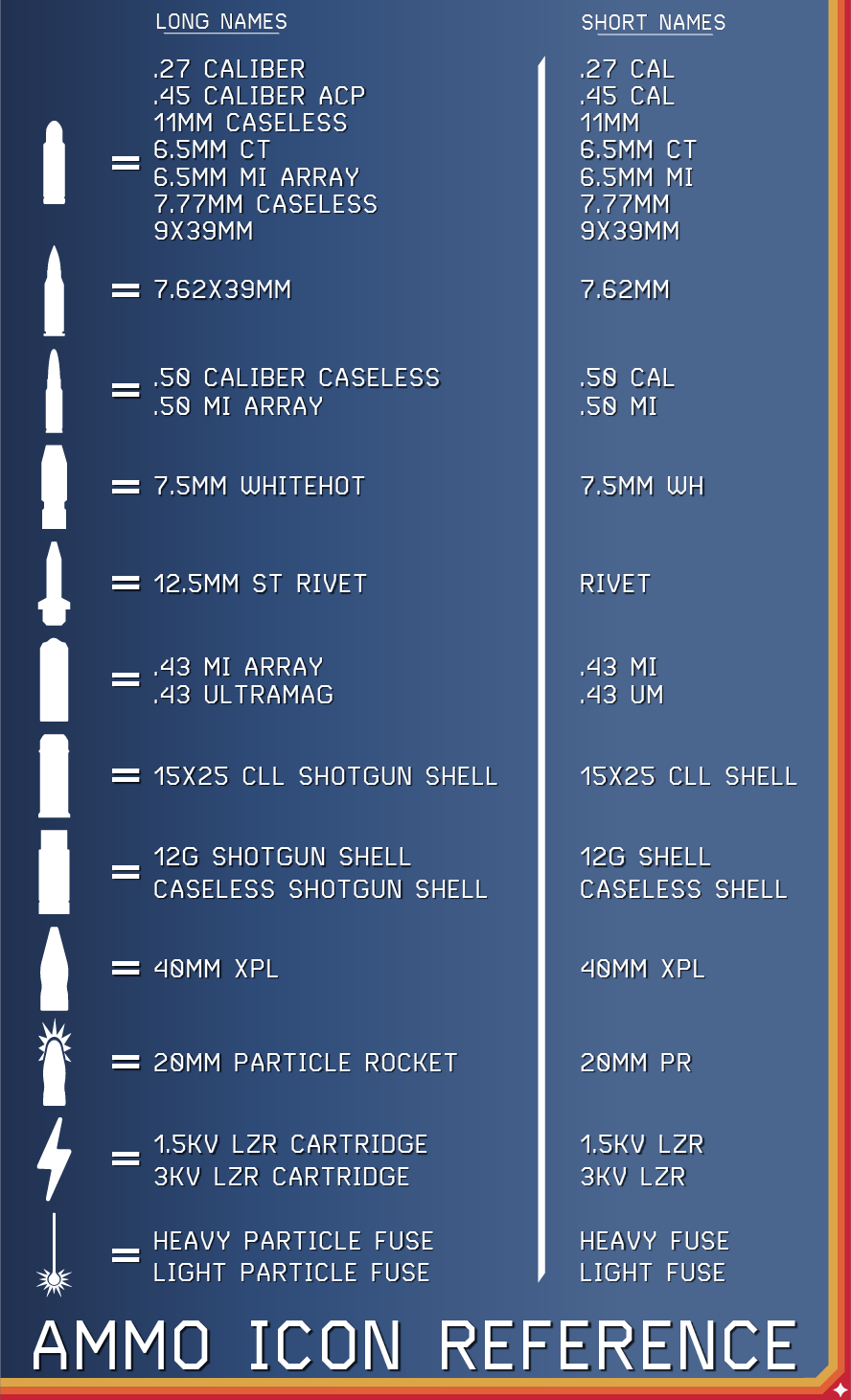
Icon Reference


Future Plans

- Continue creating new compatibility patches for new weapon mods
- Update existing patches as mods update
- Work with other authors to add Ammo HUD support to their own mods
- Make full color "slightly better" weapon icons as an option
Credits

- Big thank you to FSNovask for writing an article about porting their Show Power Name on HUD mod to another which got me started on how ActionScript works.
- This mod was inspired by ATIL - Ammo Type Icons and Labels from FabioZumbi12 after it required updates and seems to have been abandoned.
- Thank you to NovaFinchCreations for being friendly and collaborating on weapon icons with other mod authors and myself.
Ammo Icon Usage

I want to allow others to use my ammo icon set if they want to in their own projects. There is an optional file added called "PXC_AmmoHUD_IconSet.zip" which includes 3 standard vector files with each icon and their respective ammo type, these files are provided to the community and may be used anywhere. All I ask is that you attribute this mods link in your project page somewhere. (Also explained in Permissions and Credits)
Links
-
Creations

- Long Labels:
- Short Labels:
- Weapon Icons Only
There is just too many patches to list here now, please visit my profile on Creations to see all of my mods and the available Ammo HUD patches on Creations.
