Custom Weapon Icon Resources
This information is also on Nexus
This is a resource for other mod authors to add their own custom HUD and Favorites menu weapon icons.
If you are not a mod author making a custom weapon mod, you do not need to download this as it will be a file mod authors include in their mod.
If you are a mod author who has a custom HUD mod, This Article explains how to update your existing player HUD interface files with fairly minimal effort.
Table of Contents
You can click any image to enlarge it
Native Custom Weapon Icon Support
Starfield beta branch v1.15.214 changed the player HUD and Favorites menu interface files to allow mod authors to include their own custom weapon icons in their mod. It's unfortunately not as straight forward as just creating an icon image or having the CK generate an icon texture and it does require some flash knowledge. To that end I set out to figure out how it loaded icons and was able to make it work easily.
This modding resource is the output from that, I have created a whole tutorial and template SWF file so any mod author can download this, make the edits as needed and include the files inside their mod to make their custom weapon have icons out of the box.
Native Ammo HUD support
Ammo HUD v4.0.0 has been rewritten so that it can inject itself between your custom weapon icon SWF file and the HUD/Favorites menu. This allows me to essentially natively support your mod in Ammo HUD with out a compatibility patch.
Methodology Adoption Around Rechambering with OMODs
Since the game still does not provide the name of the ammunition to the player HUD event (Explained Here) I do not have a way to query for that information. This means that my Ammo HUD custom SWF has to have that information. I have abstracted it in a way that makes that easy for me to manage and if the game ever adds that data to the required event I can easily implement that in the future.
That being said, in order for me to natively support your mod in Ammo HUD and you have an OMOD that changes the ammunition for the weapon, then it would be great if you cloned your icon SWF to a new linkage name and swapped out the keyword in your OMOD (i.e. CCSUP_AAPDW27 and CCSUP_AAPDW273KV).
This allows me to inject Ammo HUD data for all ammunition used by your weapon with out a patch.
I have written This Article which explains how to do this with your weapon in the Creation Kit.
Usage and Credits
- Please note that you used this template by me somewhere in your mod description (a link to this page would be cool too but not required).
- This can be included in any mod, paid or otherwise.
Please do not forget to add a credit on your mod page!
Permissions
- Other user's assets
- All the assets in this file belong to the author, or are from free-to-use modder's resources
- Upload permission
- You can upload this file to other sites but you must credit me as the creator of the file
- Modification permission
- You are allowed to modify my files and release bug fixes or improve on the features so long as you credit me as the original creator
- Conversion permission
- You can convert this file to work with other games as long as you credit me as the creator of the file
- Asset use permission
- You are allowed to use the assets in this file without permission as long as you credit me
- Asset use permission in mods/files that are being sold
- You are allowed to use the assets in this file in mods/files that are being sold, for money, on Steam Workshop or other platforms
- Asset use permission in mods/files that earn donation points
- You are allowed to earn Donation Points for your mods if they use my assets
Tutorial Information
Getting started
There are a few prerequisites which will be required to make this work.
Required Software
- You will need Java 8 or newer installed (Required for JPEXS)
- You will need to download and install JPEXS Free Flash Decompiler
- You will need standard mod development tools (CK and/or XEdit)
- You will need a program to make your icon a SVG (Adobe Illustrator, Canva Affinity, Inkscape, etc.)
Creating Weapon Icon Image
The best way that I have found to make icons is to preview the weapon in CK with the textures disabled (so its all pink) and the background in the preview window turned off. This allows an easy single-color image that you can then use live trace in your vector tool to generate a vector image of the weapon silhouette.
Creation Kit Preview Process
The below tutorial shows how I setup the CK weapon preview to get a large silhouette to vectorize
Vector Program Tutorials
I have created some tutorials on how to create a vector icon from a CK screenshot
Creation Kit Icon Generation
You can also just use the CK to generate your icon for the weapon workbench and go from there, but I have found this generates a very small image and makes it hard to convert it to a good quality icon.
Custom Weapon Mod
This is kind of an obvious one, you are here reading this because you want to add custom icons to your custom weapon mod but its technically a prerequisite so I'm mentioning it here.
Tutorials
These tutorials explain how to properly setup your mod and use my provided tools and template
- Creation Kit: Creating required keyword
- Creation Kit: Configuring your weapon (Single ammunition type)
- Creation Kit: Configuring your weapon + OMODS (Multiple ammunition types)
- Starfield Weapon Icon File Builder
- JPEXS FFDec: Manually creating your icon file using the template
Adding the interface files to your mods BA2 archive
This is just a quick overview on what the files should look like in your BA2 archive, I'm just going to use archive2 for this but you can use any of the other tools and I believe CK supports these files in an archlist
For this tutorial I am going to use the Starfield Data directory instead of my usual MO2 just so its obvious where the files are going but you want to place all the SWF files you just made in Data\Interface

Final Icon files
Then just add them to your BA2 archive, here I am just going to add them into bubs BA2 for his "Plasma Weapons Bundle" mod:
These files go in the "Main" BA2 archive

BA2 archive with added icon files
Thats all you need to do to package it up!
Custom icons showing in game
Now just to show that it works in game, I have disabled all mods except "Plasma Weapons Bundle", my patch to it, and SKK Fast Start so I can show this off faster.
This particular mod requires me to craft the custom HUD icon to show the custom icon, so in these screenshots I have already done this. You do not need to make the icon craftable in your mod, as long as you have the right keyword added to your weapon form then you should be good.
HUD Icons
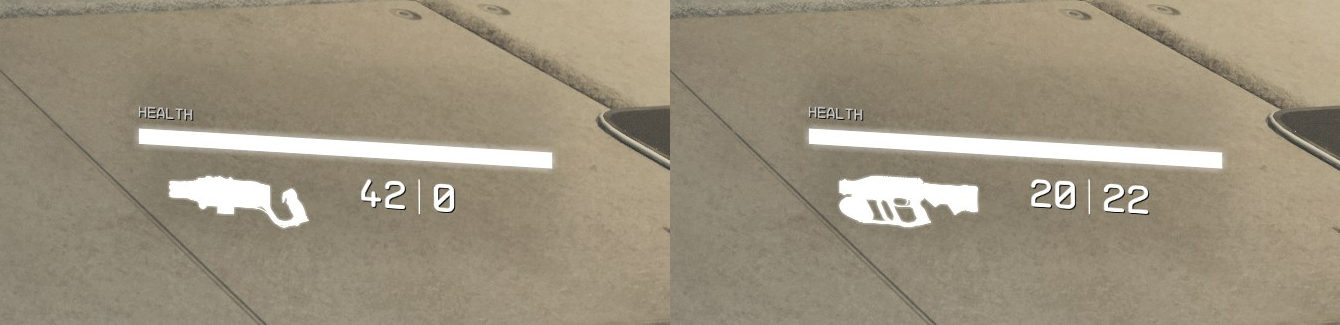
HUD Icons in game
Favorite Icons
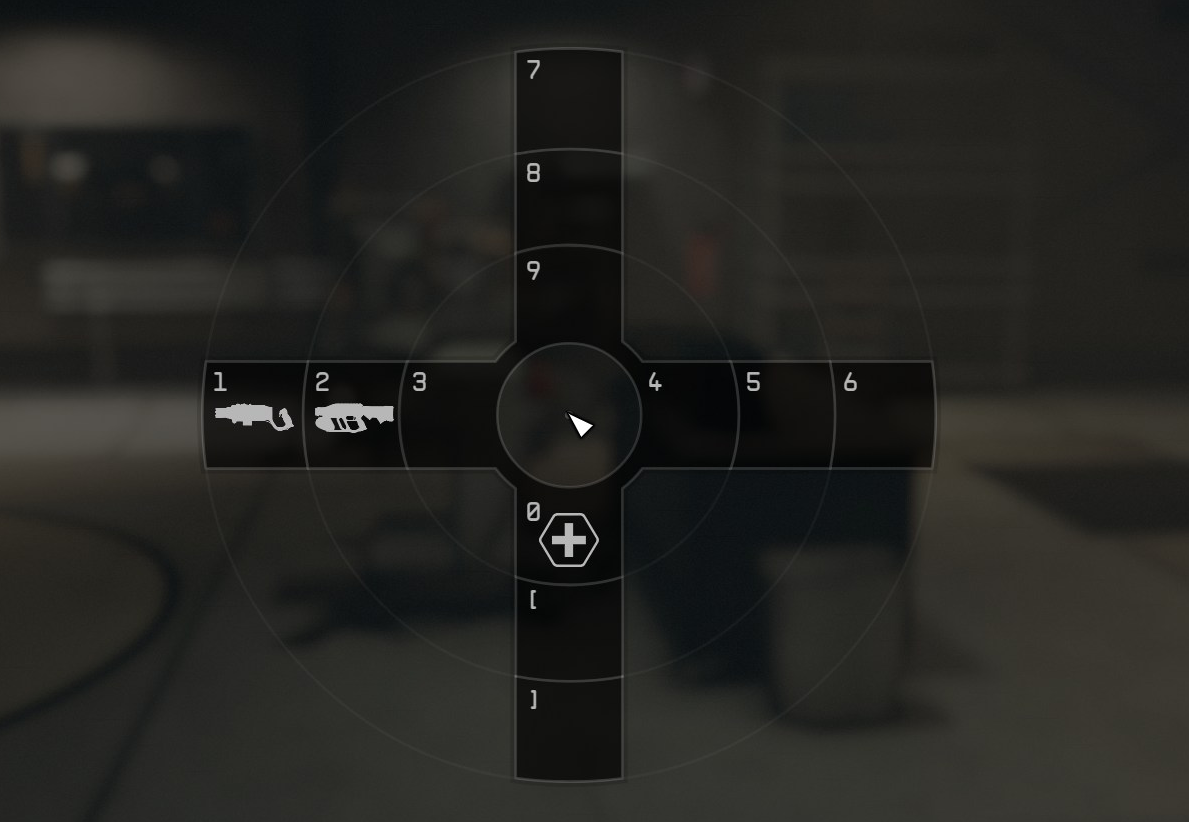
Favorite Icons in game